

What is a screenplay table read?
A screenplay table read is a continuous reading of the script aloud, with voices assigned to the characters and a narrator reading the action. It lets the writer experience dialogue, pacing and scene transitions in real time before the screenplay reaches production.
Reading in your head is generous to the draft. You supply the pace, intention and emphasis you meant. A table read removes some of that invisible assistance. Repetition becomes audible. Long speeches occupy real time. Characters who looked distinct may begin to sound alike.
A live read adds human interpretation and group energy. A generated table read is not a replacement for actors, but it gives a solo writer a fast, repeatable diagnostic before asking people to assemble. ForgePad creates table reads from scenes with character voices, narration, playback and export tools.
What a generated screenplay table read looks like
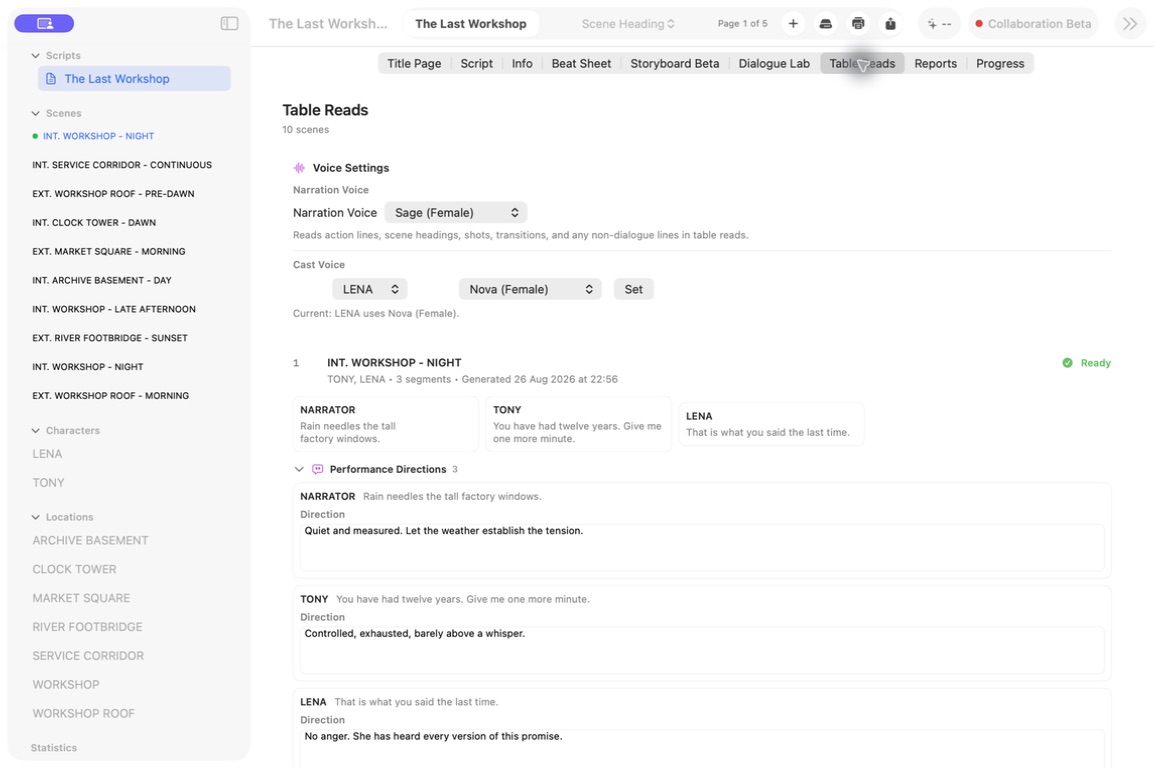
Begin by playing the scene without editing. Mark the first moment attention drifts, a character voice becomes indistinct or the audience receives information twice. Then replay only that exchange and identify whether the cause is the wording, the dramatic objective or the length of the beat.
For example, if two characters repeat the same disagreement for six lines, cutting individual words may not help. Give one character a new tactic or let new information change the balance of the scene. Play the revised exchange again and compare the audience effect, not merely the duration.
Screenplay table-read checklist
- Choose the sequence or complete draft you want to test.
- Export or generate one clearly dated version.
- Assign every speaking character and one narrator.
- Tell readers whether you are testing dialogue, pace, clarity or the whole experience.
- Prepare a simple marking system so the read can continue without constant stops.
- Leave time for focused questions after the final line.
- Collect the notes, then wait before deciding what to rewrite.
How to prepare a screenplay table read
Choose one purpose
Decide what this read needs to reveal: dialogue, pace, scene clarity, character distinction, overall structure or readiness for a live audience. You may notice everything, but a primary question prevents a vague notes session.
Stabilise the draft
Share one clearly dated version. Avoid rewriting while files are already with readers. If you are using ForgePad, generate from the exact scenes you intend to test.
Assign narration and characters
For a live read, use a narrator for action and scene headings. Give major characters distinct readers where possible. For a generated read, choose voices with enough contrast that you can follow rapid exchanges.
Create a simple notes system
Use marks you can make without looking away for long: D for dialogue, P for pace, C for clarity and a star for moments that land. The table read is an experience first and an edit session second.
How to run the read
- State the purpose and ask readers to perform the text as written on the first pass.
- Begin with a short sample so voice levels and pacing can settle.
- Do not stop after every imperfect line. Mark it and keep the scene’s momentum.
- Notice where attention rises or falls, not only where a word sounds awkward.
- After the read, ask specific questions before inviting general opinions.
- Separate comprehension problems from taste. If several people were confused in the same place, investigate the page.
Listen for the moment the audience gets ahead of the scene, falls behind it or stops needing what the characters are saying.
What to listen for in screenplay dialogue
- Shared voice: could the lines be reassigned without anyone noticing?
- Repeated information: does the scene explain something the audience already knows?
- On-the-nose intention: do characters state the feeling that their behaviour already shows?
- Unplayable sentences: are there lines that resist breath, emphasis or natural interruption?
- Flat power: does the conversational advantage change, or does the scene stay on one level?
- Late starts and slow exits: can the scene enter closer to the conflict and leave after the decisive change?
How to hear your screenplay in ForgePad
- Open the screenplay and move to the Table Reads workspace.
- Select or generate the scene you want to test.
- Assign or review the character voices and narration.
- Play the full scene once without editing.
- Replay the exchanges that felt slow, unclear or emotionally false.
- Export a read when you need to review it away from the editor.
- Return to the screenplay and revise the pattern, not only the single line.
Because the table read is connected to the same project, you can move from sound to script notes and then into the rewrite without rebuilding the scene elsewhere.
Table read FAQ
Do I need actors for a screenplay table read?
No. Reading with actors is valuable, but a generated character-voice read can expose timing and repetition early. Use both at different stages when possible.
Should action lines be read aloud?
Yes, usually by a narrator. Action provides context, timing and visual turns that the dialogue alone cannot communicate.
When should I do a table read?
After a sequence or draft is coherent enough to play continuously, and again after a substantial rewrite. Small scene reads can happen much earlier.
Your screenplay already has a sound
Generate a table read in ForgePad and hear the dialogue before the next rewrite.
Hear your script in ForgePad ↗